 BYD Tech
In short
Every PostgreSQL connection is served by its own server process with its own memory, and opening one costs a process start, authentication and cold caches, so thousands of direct connections waste memory and CPU. A connection pool keeps a small set of connections open and lends them out, in the application, in an external pooler such as PgBouncer, or both. PgBouncer’s transaction mode lets thousands of clients share a few dozen server connections, at the price of session features: SET, session advisory locks, LISTEN and SQL-level PREPARE.
Key points
- PostgreSQL starts one backend process per connection, and
max_connections, 100 by default, can only change with a restart. - An app-side pool reuses connections inside one process. An external pooler such as PgBouncer shares them across every process, container and function instance.
- Session mode keeps every PostgreSQL feature but saves little. Transaction mode saves the most, and breaks anything that relies on session state.
- PgBouncer 1.21 added support for protocol-level prepared statements in transaction mode, enabled by a non-zero
max_prepared_statements. SQLPREPAREis still not tracked. - Small pools usually beat big ones. Start near twice the database’s CPU cores, then measure; add up every pool so the total stays under
max_connections. - Set a pool wait timeout,
statement_timeoutper role and an idle-in-transaction timeout, so a slow query fails fast instead of queuing everything behind it.
Why a PostgreSQL connection is expensive
PostgreSQL’s documentation describes its architecture as a “process per user” model: every client connects to exactly one backend process. A supervisor process, the postmaster, listens on the port and spawns a new backend for every connection request. That design is robust, since one crashed backend does not take others with it, but it makes connections heavyweight.
- Opening one is slow. A new connection means a TCP handshake, usually TLS, password authentication such as SCRAM, a new server process, and caches of catalog data that start empty in that process. For a query that takes a millisecond, the connection can cost more than the work.
- Holding one uses memory. Each backend has its own private memory on top of the shared buffers. The documentation on
work_mem(4 MB by default) warns that one complex query can run several sort and hash operations at once, each allowed that much memory, and several sessions can do so at the same time, so the total can be many times the setting. - The ceiling is fixed.
max_connectionsis typically 100 by default and can only be set at server start, and PostgreSQL sizes some shared memory directly from it. Three connections are kept for superusers by default (superuser_reserved_connections). - Idle is not free. A thousand mostly idle connections still mean a thousand processes for the operating system to schedule and the database to track, and every one of them can suddenly become active.
The fix is to separate “clients that want to talk to the database” from “server connections doing work”. That is what a pool does.
App-side pools: a bounded queue with a timeout
Almost every database driver or framework ships a pool. It opens a fixed maximum of connections, hands one to each request for as long as it needs it, and takes it back. When all are in use, the next request waits, and after a timeout it fails. The core fits in a few lines:
import queue, threading, time

class Pool:
    def __init__(self, conns, wait_timeout):
        self._idle = queue.Queue(maxsize=len(conns))  # the bound is the pool size
        for conn in conns:
            self._idle.put(conn)
        self._wait = wait_timeout
    def acquire(self):
        try:
            return self._idle.get(timeout=self._wait)
        except queue.Empty:
            raise TimeoutError(f'no connection free after {self._wait}s') from None
    def release(self, conn):
        self._idle.put_nowait(conn)

pool = Pool(['conn-1', 'conn-2'], wait_timeout=0.2)  # stand-ins for real connections

def handle(request):
    try:
        conn = pool.acquire()
    except TimeoutError as e:
        return print(f'{request}: failed fast, {e}')
    time.sleep(0.3)  # a slow query holds the connection
    print(f'{request}: served on {conn}')
    pool.release(conn)  # in real code, in a finally block

for i in (1, 2, 3):
    threading.Thread(target=handle, args=(f'req-{i}',)).start()
    time.sleep(0.01)

# req-3: failed fast, no connection free after 0.2s
# req-1: served on conn-1
# req-2: served on conn-2
The third request waited 0.2 seconds, found no free connection and failed, while the first two finished. That failure is the point: a pool is a concurrency limit in front of the database, and the wait timeout turns overload into fast errors instead of an ever-growing queue. It is the same idea as a concurrency limiter (rate limiter system design).
Real pools add what this sketch leaves out: opening connections lazily up to the maximum, checking that a connection still works before lending it, closing connections that sat idle too long or lived too long, resetting session state on return, and always returning the connection, in a finally block or a context manager, even when the query fails. A leaked connection shrinks the pool for good.
The limit of an app-side pool is its scope: one process. Ten app servers each running four worker processes with a pool of 10 can open 400 connections, and autoscaling raises that number without asking the database.
External poolers: many clients, few server connections
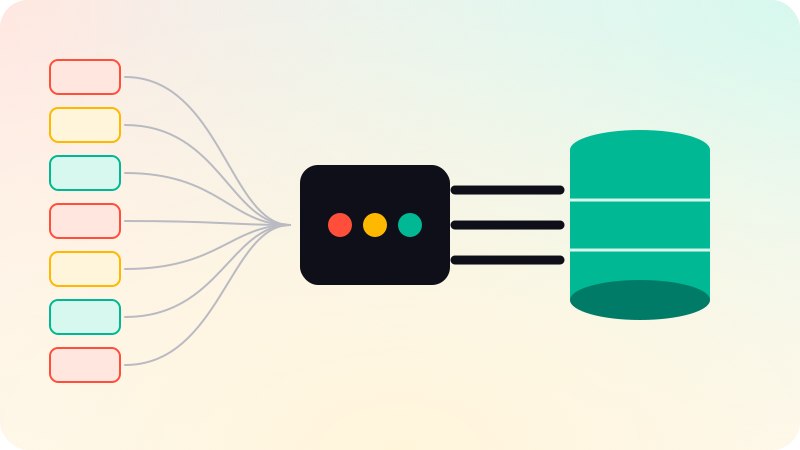
An external pooler sits between every client and PostgreSQL and speaks the PostgreSQL protocol on both sides. Clients connect to it as if it were the database; it keeps a small set of real server connections and assigns them as needed. PgBouncer is a widely used one: a lightweight process that accepts many client connections (max_client_conn, 100 by default) and keeps at most default_pool_size server connections, 20 by default, for each user and database pair.
App-side pools and an external pooler are not alternatives. The app pool removes connect latency inside each process; the external pooler caps the total the database sees, however many processes there are. With both, keep the app pools small, since the pooler does the multiplexing. Managed PostgreSQL services often run a pooler or proxy for you, which follows the same rules described below.
PgBouncer pool modes: session, transaction and statement
The pool mode decides when PgBouncer takes a server connection back from a client. PgBouncer’s documentation describes three:
- Session pooling, the default. A client gets a server connection for as long as it stays connected. Every PostgreSQL feature works, but it only helps when clients connect and disconnect often; a thousand clients that stay connected still need a thousand server connections.
- Transaction pooling. A client gets a server connection only for the length of a transaction. Between transactions, an idle client holds nothing, so a few dozen server connections can serve thousands of clients.
- Statement pooling. Transaction pooling in which multi-statement transactions are not allowed. The documentation describes it as a way to enforce autocommit on the client, aimed mostly at PL/Proxy.
| Behavior | Session | Transaction | Statement |
|---|---|---|---|
| Server connection goes back to the pool | When the client disconnects | When the transaction ends | When the statement ends |
| Multi-statement transactions | Yes | Yes | No |
SET and other session state | Yes | No; use SET LOCAL inside a transaction | No |
| Session-level advisory locks | Yes | No; use transaction-level locks | No |
LISTEN | Yes | No | No |
SQL PREPARE and EXECUTE | Yes | No | No |
| Protocol-level prepared statements | Yes | Yes, since 1.21, with max_prepared_statements above zero | Yes, with the same setting |
WITH HOLD cursors, temp tables kept across commits | Yes | No | No |
| Server connections needed | One per connected client | One per transaction in flight | One per statement in flight |
| Typical use | Apps that need session features | Web apps, workers and serverless functions | Autocommit-only workloads |
Pool modes can be set globally, per database and per user, so one PgBouncer can run most traffic in transaction mode and give a migration user a session-mode pool. A minimal transaction-mode configuration:
[databases]
app = host=10.0.0.5 port=5432 dbname=app

[pgbouncer]
listen_addr = 10.0.0.4
listen_port = 6432
auth_type = scram-sha-256
auth_file = /etc/pgbouncer/userlist.txt

; give the server connection back when each transaction ends
pool_mode = transaction
; many client connections in, few server connections out
max_client_conn = 2000
default_pool_size = 20
max_db_connections = 40

; seconds: queue wait, idle server, server age, idle in transaction
query_wait_timeout = 30
server_idle_timeout = 600
server_lifetime = 3600
idle_transaction_timeout = 60

; track protocol-level prepared statements across server connections
max_prepared_statements = 200
What breaks in transaction mode, and the workarounds
In transaction mode, two statements from the same client outside a transaction may run on two different server connections, and the server connection a client used a moment ago may now serve someone else. Anything that leaves state on the connection stops working, and it fails in confusing ways, because the state lands on a connection another client will pick up. PgBouncer’s server_reset_query, DISCARD ALL by default, is not used in transaction pooling, so nothing cleans it up.
SET. ASET search_pathorSET statement_timeoutchanges whichever server connection ran it. Your next query may run elsewhere without it, and another client inherits it. UseSET LOCALinside a transaction, which ends with the transaction, or attach settings to the role with `ALTER ROLE ... SET`, which applies whenever PgBouncer opens a server connection for that user. PgBouncer does keep a short list of startup parameters, such asclient_encoding,TimeZoneandapplication_name, consistent per client, andtrack_extra_parametersextends that list.- Session-level advisory locks.
pg_advisory_lockbelongs to the server session, not to your client, and the unlock may run on a different connection. Usepg_advisory_xact_lock, which is released at commit, or a separate session-mode connection. Locks in general are covered in distributed locks. LISTEN. Notifications go to the session that listens, which your client no longer owns between transactions. Give listeners a direct connection or a session-mode pool. Sending withNOTIFYis fine.- Prepared statements. A statement prepared on one server connection does not exist on another. PgBouncer 1.21, released in October 2023, added tracking of protocol-level named prepared statements in transaction and statement mode, enabled by setting
max_prepared_statementsto a non-zero value; the current documentation lists a default of 200. This matters because many drivers prepare statements at the protocol level on their own. SQL-levelPREPARE,EXECUTEandDEALLOCATEare still forwarded unchanged, so they still break. WITH HOLDcursors, temporary tables that keep rows across commits, andLOAD. All live in the session. Keep them inside one transaction or move that work to a session-mode connection.
Schema migrations are the usual casualty. Migration tools often take a session-level advisory lock so two deploys cannot migrate at once, and set lock_timeout for the session. Run them over a direct connection or a session-mode pool, not through the transaction-mode pool your app uses (zero-downtime database migrations).
How big should the pool be?
Smaller than most people expect. A database server can only run as many queries truly at once as it has CPU cores, plus some overlap while queries wait on disk. Beyond that, more connections add context switching and contention for locks and memory, and throughput flattens or falls while latency rises.
The HikariCP project’s wiki page “About Pool Sizing” gives a starting point it attributes to the PostgreSQL project: connections = ((core_count * 2) + effective_spindle_count), with core count excluding hyper-threads. The page adds that nobody has analyzed how well the formula fits SSDs and that pool sizing is ultimately specific to each deployment. Its summary is a useful rule: you want a small pool, saturated with threads waiting for connections. The same page describes an Oracle Real-World Performance demonstration in which cutting the pool from 2048 connections to 96 brought response times down from about 100 ms to about 2 ms.
Little’s law gives a second check: connections busy on average equal transactions per second times the time each transaction holds a connection. An app running 400 transactions per second at 15 ms each keeps about 6 connections busy. If your pool needs far more than that, transactions are holding connections too long, often while calling another service inside a transaction.
- Budget across everything. The sum of every app pool, worker pool, pooler and admin tool must stay under
max_connections, minus reserved slots, with headroom for migrations, consoles and a failover replica. - Avoid pool deadlock. If one request can hold one connection and wait for a second, a full pool deadlocks itself. HikariCP’s page gives the minimum size to avoid it as
Tn × (Cm - 1) + 1, where Tn is the number of threads and Cm the most connections one thread holds at once. Better still, use one connection per request. - Separate slow work. Give reports and background jobs their own small pool, so a slow export cannot starve the pool that serves page loads.
Serverless functions and other short-lived clients
Serverless functions turn the pooling problem inside out (what is serverless). Each function instance is its own process with its own pool, instances start and stop with traffic, and a frozen instance can keep its connection open without using it. A burst that starts 300 instances, each with a pool of 5, asks the database for 1,500 connections.
- Set the in-function pool to one connection, and open it outside the handler so warm invocations reuse it.
- Connect through an external pooler in transaction mode, so the database sees the pooler’s few server connections rather than one per instance.
- Cap concurrency on the function side too, where the platform allows it, so the queue forms before the database rather than inside it.
- Close idle client connections at the pooler (
client_idle_timeout) so connections from frozen instances do not pile up.
Managed PostgreSQL services add limits of their own. They usually derive the default max_connections from the instance size, keep some connections for their own monitoring and replication, and many offer a built-in pooler, a proxy, or an HTTP query API meant for serverless clients. Check the documented limit for your instance size rather than assuming the default, and remember that a smaller instance often means fewer connections.
Timeouts that keep a pool healthy
| Timeout | Where | What it stops |
|---|---|---|
| Pool wait timeout | App pool; query_wait_timeout in PgBouncer, 120 seconds by default | Requests queuing forever behind a full pool |
statement_timeout | PostgreSQL, per role or per transaction | One slow query holding a connection indefinitely |
idle_in_transaction_session_timeout | PostgreSQL | A session that opened a transaction and went quiet, holding locks and blocking vacuum |
idle_transaction_timeout | PgBouncer | A client idle inside a transaction, pinning a server connection |
| Idle connection timeout | App pool; server_idle_timeout in PgBouncer, 600 seconds by default | Unused connections holding database memory |
| Max connection lifetime | App pool; server_lifetime in PgBouncer, 3600 seconds by default | Very old connections, and connections stuck to an old server after failover |
PostgreSQL’s documentation advises against setting statement_timeout in postgresql.conf, because it would affect all sessions. Set it per role with ALTER ROLE app SET statement_timeout = '5s', which also survives transaction pooling, or with SET LOCAL for one transaction. The documentation also warns about idle_session_timeout on connections that come through a pooler, which may not react well to the server closing them; leave that one to the pooler’s own idle settings.
Keep the timeouts in order: the database’s statement_timeout shorter than the app’s request timeout, and the pool wait timeout short enough that a request fails while the client is still waiting for it. Endpoints that page through large tables are a common source of long-held connections; keyset pagination keeps each query short (API pagination: offset vs cursor).
Monitoring: pg_stat_activity and SHOW POOLS
-- Client connections by application and state
SELECT application_name, state, count(*) AS conns,
       max(now() - state_change) AS longest_in_state
FROM pg_stat_activity
WHERE backend_type = 'client backend'
GROUP BY application_name, state
ORDER BY conns DESC;

-- Sessions holding a transaction open while doing nothing
SELECT pid, usename, application_name,
       now() - xact_start AS open_for,
       left(query, 60) AS last_query
FROM pg_stat_activity
WHERE state IN ('idle in transaction', 'idle in transaction (aborted)')
ORDER BY open_for DESC;

-- In the PgBouncer admin console: psql -p 6432 pgbouncer
SHOW POOLS;
-- Watch cl_waiting (clients queued for a server connection),
-- maxwait (seconds the oldest has waited), sv_active and sv_idlepg_stat_activityshows one row per server process. Itsstatecolumn tellsactivefromidle,idle in transactionandidle in transaction (aborted);backend_type = 'client backend'filters out background workers. Manyidlerows with a pooler in front usually mean the pool is larger than it needs to be.- Rows in
idle in transactionwith a growingnow() - xact_startare application bugs: a transaction opened and not closed, often around a slow call to another service. - In PgBouncer’s
SHOW POOLS,cl_waitingcounts clients that sent a query and have no server connection yet, andmaxwaitis how long the oldest of them has waited. Acl_waitingthat stays above zero means the pool is too small or queries are too slow; check which before raising the pool size. sv_activeagainstsv_idleshows how much of the server-side pool is actually in use. A pool that never uses half its connections can shrink.
BYD Tech builds web apps and the databases behind them: the code lives in the client’s GitHub from day one, AI-assisted work is reviewed by an engineer, and IP is assigned to the client.
Sources
Checked when this post was written.
- PostgreSQL docs: How Connections Are Established
- PostgreSQL docs: Connections and Authentication (max_connections)
- PostgreSQL docs: Resource Consumption (work_mem)
- PostgreSQL docs: Client Connection Defaults (statement and idle timeouts)
- PostgreSQL docs: The Cumulative Statistics System (pg_stat_activity)
- PgBouncer: Features (pool modes and SQL feature map)
- PgBouncer: Configuration
- PgBouncer: Usage (admin console and SHOW POOLS)
- PgBouncer: Changelog (1.21.0, prepared statements)
- HikariCP wiki: About Pool Sizing