 BYD Tech
In short
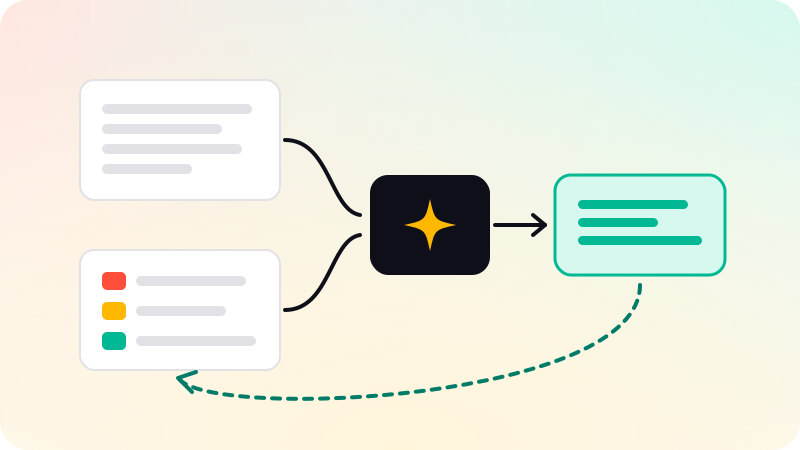
A model with tools never runs anything itself. You send it the conversation plus tool definitions (a name, a description and a JSON Schema for the arguments), and when it decides a tool would help, it returns a structured request naming the tool and its arguments. Your code validates that request, runs the tool, appends the result to the conversation and calls the model again, and the loop repeats until the model answers in plain text or a limit you set stops it.
Key points
- A tool definition is a name, a description the model reads to decide when to use the tool, and a JSON Schema for its arguments.
- The model returns a tool-call request with an ID. Running the tool, and matching each result to that ID, is your code’s job.
- The loop ends when the model replies without a tool call, or when your step limit, timeout or token budget stops it.
tool_choicelets the model decide, forces a call or switches tools off; strict schemas make the arguments match your schema.- Validate every argument, ask a person before consequential actions, and treat tool output as untrusted data.
- MCP standardizes how an app discovers and calls tools that live in a server. The loop itself stays in your app.
What a tool definition is
Tool calling, which OpenAI and Google also call function calling, lets a model ask your application to run code. You describe each tool you are willing to run, and the model chooses from that list. On every major API a definition has three parts:
name: a stable identifier such asget_order_status. Anthropic allows letters, digits, underscores and hyphens, up to 128 characters; the MCP spec recommends the same length and also allows dots.description: plain text the model reads to decide when to call the tool and what to pass. It is part of the prompt, and Anthropic’s docs call detailed descriptions "by far the most important factor" in tool performance.- A JSON Schema for the arguments: their types, which are required, allowed values and a description for each field.
{
  "name": "get_order_status",
  "description": "Look up the shipping status of one order by its order ID. Use it when the user asks where an order is or when it will arrive. Returns the status and the time of the last update. Does not return payment or address details.",
  "parameters": {
    "type": "object",
    "properties": {
      "order_id": {
        "type": "string",
        "description": "The order ID as printed on the receipt, e.g. ORD-10422"
      },
      "include_history": {
        "type": "boolean",
        "description": "true to also return earlier status changes"
      }
    },
    "required": ["order_id", "include_history"],
    "additionalProperties": false
  }
}
That is the OpenAI Responses shape. The schema inside is plain JSON Schema everywhere; only the envelope around it changes:
| API | Where the schema goes | Envelope |
|---|---|---|
| OpenAI Responses | parameters | type: "function" with name, description, parameters and strict side by side |
| OpenAI Chat Completions | function.parameters | type: "function" and a nested function object with the same fields |
| Anthropic Messages | input_schema | name, description, input_schema, with optional strict and input_examples |
| Google Gemini | parameters | A function declaration with name, description and parameters |
| MCP server | inputSchema | Listed by tools/list, with optional title, outputSchema and annotations |
Write descriptions the way you would brief a new colleague: what the tool does, when to use it and when not to, what each argument means, and what it does not return. Keep results small, with stable IDs and only the fields the model needs for its next step. Every byte of a result goes back into the context.
What the model actually returns
When the model decides to use a tool, its response contains a structured tool-call request instead of, or next to, text. Nothing has run yet. The request carries the tool name, the arguments and an ID that ties your result to this call.
// OpenAI Responses API: an item in response.output
{ "type": "function_call", "call_id": "call_8f2", "name": "get_order_status",
  "arguments": "{\"order_id\": \"ORD-10422\", \"include_history\": false}" }

// ...answered by an item in the next request's input
{ "type": "function_call_output", "call_id": "call_8f2",
  "output": "{\"status\": \"shipped\", \"updated\": \"2026-11-02T09:14:00Z\"}" }

// Anthropic Messages API: a content block, with stop_reason "tool_use"
{ "type": "tool_use", "id": "toolu_01X", "name": "get_order_status",
  "input": { "order_id": "ORD-10422", "include_history": false } }

// ...answered in the next user message, results first
{ "role": "user", "content": [
  { "type": "tool_result", "tool_use_id": "toolu_01X",
"content": "{\"status\": \"shipped\", \"updated\": \"2026-11-02T09:14:00Z\"}" } ] }| OpenAI Responses | OpenAI Chat Completions | Anthropic Messages | |
|---|---|---|---|
| The call | An output item with type: "function_call", call_id, name, arguments | tool_calls on the assistant message, each with id, function.name, function.arguments | A content block with type: "tool_use", id, name, input |
| Arguments arrive as | A JSON string to parse | A JSON string to parse | An object |
| How you know to continue | function_call items in output | finish_reason: "tool_calls" | stop_reason: "tool_use" |
| What you send back | An input item with type: "function_call_output", call_id, output | A message with role: "tool", tool_call_id, content | A user message of tool_result blocks with tool_use_id, content and optional is_error |
Gemini follows the same pattern: the model returns a function call with a name, arguments and an ID, and your application sends back a function result. Google’s docs state it directly: the model does not execute the function, your application does.
Two details catch people out. OpenAI’s arguments are a JSON-encoded string, and its reference warns the model can produce invalid JSON, so parse it defensively. Anthropic requires the tool_result blocks to come first in the next user message, straight after the assistant turn that asked for them; text placed before them is a 400 error.
The agent loop, step by step
- Send the conversation and the tool definitions to the model.
- Read the response. If it contains no tool calls, it is the final answer: stop.
- Append the assistant turn, tool calls included, to the history. The next request must contain the calls that your results answer.
- For every call, look the tool up by name, parse and validate the arguments, check permissions, and run it with a timeout.
- Append one result per call, matched by ID, including failures marked as errors.
- Check your limits on steps, time and tokens, then go back to step 1.
// Provider-neutral. callModel() adapts one API to these shapes.
type ToolCall = { id: string; name: string; args: unknown };
type ToolResult = { id: string; content: string; isError: boolean };

async function runAgent(history: Message[], maxSteps = 8): Promise<string> {
  for (let step = 0; step < maxSteps; step++) {
    const turn = await callModel(history, TOOL_DEFINITIONS);
    history.push(turn.assistantMessage);           // the calls stay in history
    if (turn.toolCalls.length === 0) return turn.text; // plain answer: done

    const results: ToolResult[] = await Promise.all(
      turn.toolCalls.map((call) => runOne(call)),  // concurrent: read-only tools
    );
    history.push(toolResultsMessage(results));     // every result, one message
  }
  return "I stopped before finishing. Try a narrower request.";
}
callModel is a thin adapter over whichever API you use, and the tables above are what it translates. The loop itself does not change between providers, which is why SDK helpers, such as Anthropic’s tool runner, and agent frameworks can run it for you. Writing it once by hand is still the quickest way to see where validation, approval and limits belong.
The pattern has a name in the research literature. ReAct (Yao et al.) prompts a model to interleave reasoning traces with actions, such as calls to a Wikipedia search API, and to read each observation before the next step. The authors report that this reduced the hallucination and error propagation they saw with chain-of-thought alone on HotpotQA and FEVER, and that it beat imitation and reinforcement learning baselines on ALFWorld and WebShop. Native tool calling is the same idea with the action format built into the API. Whether a task needs a loop at all is a separate question: see AI workflows vs agents.
Parallel tool calls
A model can ask for several tools in one turn: the weather in two cities, or an order lookup and a stock check. OpenAI returns several function_call items, Anthropic several tool_use blocks, and Gemini documents parallel calls too. Run them and send every result back in the next turn. Anthropic’s docs are explicit that all results for one assistant turn go in a single user message, with no text before them, and that this is what keeps parallel calling working.
- Independent, read-only calls can run concurrently. Calls with side effects or an order that matters are safer one at a time.
- Match results to calls by ID, never by position.
- A failed call gets an error result; the other results still go back.
- To turn parallel calls off, set
parallel_tool_calls: falseon OpenAI, after which the model calls zero or one tool, ordisable_parallel_tool_use: trueinside Anthropic’stool_choiceobject.
Forcing, limiting and switching off tool use
By default the model decides whether to call a tool. tool_choice overrides that:
| What you want | OpenAI | Anthropic |
|---|---|---|
| The model decides (default) | "auto" | {"type": "auto"} |
| Call some tool | "required" | {"type": "any"} |
| Call this tool | {"type": "function", "name": "get_order_status"} | {"type": "tool", "name": "get_order_status"} |
| No tool calls | "none" | {"type": "none"} |
| Only some of the tools | type: "allowed_tools" with a mode and a list of tools | Send only those tools |
Gemini’s docs list the modes auto, any, none and validated, plus allowed_tools to narrow the set. Forcing has side effects: Anthropic notes that with any or tool the model emits the call with no text before it, and its docs list newer models that reject forced tool use with a 400 error and recommend auto with strict tools instead. Check the model you deploy.
Strict schemas solve a different problem: arguments that do not match the schema, such as the string "2" where you wanted the integer 2. With strict: true on a tool, OpenAI and Anthropic constrain generation so that the arguments follow your schema; both support a subset of JSON Schema. OpenAI’s strict mode requires additionalProperties: false on every object and every property listed in required. In its Responses API, leaving strict out makes the API try strict mode and fall back when the schema does not fit, while Chat Completions stays non-strict unless you set it.
For a final answer in a fixed JSON shape, rather than tool arguments, use structured outputs: see LLM structured outputs. And remember that strict mode guarantees shape, not sense. A schema-valid order_id can still belong to another customer.
Errors, retries and limits
Failures come in two kinds, and they go to different places.
- Tool failures go back to the model as a result marked as an error:
is_error: trueon Anthropic,isError: truein MCP, an error message in the output on OpenAI. Make the message useful: "Order ORD-10422 not found; ask the user to check the ID" beats "failed". Anthropic’s docs say Claude retries an invalid call two or three times with corrections before apologizing to the user. - Infrastructure failures, such as rate limits, server errors and timeouts when calling the model, are your code’s problem. Retry with exponential backoff and jitter, honor
Retry-After, and do not spend a loop step on them. - MCP draws the same line: unknown tools and malformed requests are JSON-RPC protocol errors, while API failures and invalid input are tool execution errors that the model can learn from.
async function runOne(call: ToolCall): Promise<ToolResult> {
  const fail = (msg: string) => ({ id: call.id, content: msg, isError: true });

  const tool = TOOLS.get(call.name);
  if (!tool) return fail(`Unknown tool: ${call.name}`);

  const parsed = tool.schema.safeParse(call.args);  // e.g. a Zod schema
  if (!parsed.success) return fail(`Invalid arguments: ${parsed.error.message}`);

  if (tool.needsApproval && !(await askUser(call))) {
    return fail("The user declined this action. Do not retry it.");
  }
  try {
    const output = await withTimeout(tool.run(parsed.data, session), 10_000);
    return { id: call.id, content: JSON.stringify(output), isError: false };
  } catch (err) {
    return fail(`Tool error: ${String(err)}. Tell the user and stop.`);
  }
}
Limits keep a confused model from running forever:
- A maximum number of loop iterations, with a clear message when it is hit.
- A timeout per tool call and a wall-clock budget for the whole run.
- A token budget. Every iteration resends the whole history, so large tool results add up fast: truncate or summarize them. More levers are in how to reduce LLM costs.
- Loop detection: the same tool with the same arguments several times in a row usually means the model is stuck.
- Idempotency keys on tools that write, so a retried call does not create a second order.
Safety: validate, confirm, distrust
The model picks tool arguments from text it has read, and some of that text may come from someone hostile. Design as if any call could be wrong.
- Validate arguments against the schema and against business rules. Authorization comes from the session, not from the arguments: an order lookup uses the signed-in user’s identity, which is why
runOnepassessessionto the tool. - Give each tool the least access it needs. A read-only tool cannot be talked into deleting anything.
- Ask a person before consequential actions: sending, buying, deleting, publishing. The MCP spec says there should always be a human in the loop who can deny a tool invocation, and that clients should show tool inputs to the user before calling the server.
- Treat tool output as untrusted data. A web page, email or ticket returned by a tool can carry instructions aimed at the model, which is indirect prompt injection. Anthropic’s docs recommend keeping such content inside tool results rather than the system prompt. See prompt injection.
- Never pass model output straight into a shell, a SQL query or an HTML page. Parameterize, escape and allowlist.
- Log every call with its arguments, its result and who approved it.
More patterns are in AI agent guardrails, and how to test them is in how to evaluate AI agents.
Where MCP fits
Without a standard, every app wires its tools in by hand. The Model Context Protocol (MCP) standardizes the part between your app and the tools: a server exposes tools, and any MCP client can discover and call them.
- Discovery: the client sends
tools/listand gets each tool’sname,descriptionandinputSchema, plus optionaltitle,outputSchemaandannotations. A server that declareslistChangedsendsnotifications/tools/list_changedwhen its set changes. - Invocation: the client sends
tools/callwith anameandarguments. The result holdscontentblocks (text, images, resource links), optionalstructuredContentmatching theoutputSchema, andisError. - Annotations that describe a tool’s behavior are hints. The spec says clients must treat them as untrusted unless they come from trusted servers.
MCP does not replace the loop. Your app, the MCP host, still turns the listed tools into the provider’s tool format, sends them to the model, receives the tool call and forwards it to the right server with tools/call. When two servers expose tools with the same name, such as two search tools, the spec suggests a disambiguation strategy such as a server prefix. For the bigger picture, see what an MCP server is; for an assistant that only retrieves and answers, see system design: an AI chat assistant for a website.
If you need an agent like this inside your product, BYD Tech builds AI agents: the code lives in your GitHub from day one, and AI-assisted work is reviewed by an engineer.
Sources
Checked when this post was written.
- OpenAI: Function calling
- OpenAI API reference: Create chat completion
- Anthropic: Define tools
- Anthropic: Handle tool calls
- Anthropic: Parallel tool use
- Anthropic: Strict tool use
- Google: Function calling with the Gemini API
- Model Context Protocol specification (2026-07-28): Tools
- Yao et al., ReAct: Synergizing Reasoning and Acting in Language Models (arXiv:2210.03629)