 BYD Tech
The short answer
Scale a web app by measuring where the time goes first, then fixing the cheapest bottleneck before the next one. For most apps the usual order is slow database queries and missing indexes, then caching, a CDN for static files, moving slow work into background jobs, connection pooling, read replicas, and more app servers behind a load balancer. Splitting into separate services comes last, and only when one part of the system clearly needs to scale or change on its own.
Key points
- Measure before you change anything: latency percentiles, traffic, errors and how full each resource is.
- The database is the most common bottleneck. Indexes and fixing a few slow queries often matter more than new servers.
- Caching and a CDN take repeated work off the servers you have.
- Anything slow that the user does not need to wait for belongs in a background job.
- Keep app servers stateless, so you can add more of them behind a load balancer.
- Load test before a launch or campaign, and fix the first thing that breaks.
Measure first: find where the time goes
An app that feels slow under load has a bottleneck, usually one, and guessing which one wastes effort. Adding servers does nothing if every request waits on the same slow database query. So the first step is to see what is happening.
Google’s site reliability engineering book names four golden signals worth watching for any service: latency (how long requests take), traffic (how much demand there is), errors (how many requests fail) and saturation (how full the service is). It also warns against averages. A service with a fast average can still make one request in a hundred wait several seconds, and those slow requests are the ones users remember. Watch the 95th and 99th percentile response times, not only the mean.
- Application monitoring or tracing, so you can see how long each request spends in the code, the database and calls to other services.
- A slow query log on the database, to list the queries that take longest or run most often.
- Resource graphs for CPU, memory, disk and open database connections, so you can see what fills up first.
- Real user timings from the browser, because a fast server can still deliver a slow page.
Then pick the endpoint or page with the most total time spent, which is roughly how slow it is multiplied by how often it is called, and work on that.
The usual order of fixes
Every app is different, but the fixes below tend to come in this order, from cheapest and most effective to most involved. Each step makes the next one easier to judge.
- Fix slow queries and add the right indexes.
- Cache results that are expensive to compute and read often.
- Serve static files and images from a CDN.
- Move slow work, such as emails, reports and file processing, into background jobs.
- Pool database connections.
- Send read-heavy traffic to read replicas.
- Run more app servers behind a load balancer, and scale them with demand.
- Split a part of the system into its own service, only when the evidence says it needs to scale or change separately.
A bigger server, called scaling vertically, is a reasonable early move too. It changes no code and buys time, though it has a ceiling and leaves a single point of failure.
Start with the database: indexes and slow queries
Most web apps are a thin layer over a database, and most slowdowns as data grows come from queries that were fine with a thousand rows and are not with ten million. The usual culprits:
- A missing index, so the database reads the whole table to find a few rows.
- The same query run once per item in a list, often called the N+1 problem, where one page triggers hundreds of queries.
- Pages that load every record instead of a page of results.
- Queries that fetch far more columns or rows than the screen shows.
- Long transactions or locks that make other requests wait.
Databases can show you their plan for a query. In PostgreSQL, EXPLAIN shows the plan and EXPLAIN ANALYZE runs the query and reports the actual time spent in each step, which makes a full table scan or a bad estimate easy to spot. Database indexing explained covers how indexes work and how to read a plan.
Caching and a CDN
Caching keeps a copy of a result so the next request does not repeat the work. It can sit in several places: in the browser, at a CDN, in an in-memory store in front of the database, or inside the app for values that rarely change. The hard part is not storing the copy but deciding when it is out of date. Caching strategies covers the common patterns, expiry times and invalidation.
A content delivery network stores copies of static files, such as images, scripts, stylesheets and fonts, on servers close to your users. That takes a large share of requests off your own servers and makes pages faster for people far from them. Some pages that are the same for every visitor can be cached there too. See What is a CDN?.
Be careful with anything personal. A cache that serves one user’s account page to another is a security incident, not a performance problem, so cache keys must include who the data belongs to, or the response must not be shared at all.
Move slow work into background jobs
Sending email, generating a PDF, resizing uploads, calling a slow partner API or running an AI model inside a web request makes the user wait and ties up a server while they do. Put that work on a queue and let separate workers handle it. The request returns at once, and the workers can be scaled on their own.
Jobs bring their own rules: they can run twice, fail halfway or arrive out of order, so they should be safe to retry. See Background jobs and queues.
Connection pooling and read replicas
Each open connection to a database uses resources on the database server, and the number allowed is limited. In PostgreSQL the default limit is typically 100, and raising it makes the server allocate more shared memory. When you add app servers, background workers or serverless functions, each wants its own connections, and the database can run out long before it runs out of CPU. A connection pooler sits in between and lets many app processes share a smaller set of connections.
If the database is busy mainly with reads, such as dashboards, search and reports, a read replica can take them. A replica is a copy of the database that receives changes from the primary and answers read-only queries. The catch is delay: the PostgreSQL documentation says data on a standby arrives after a measurable delay and is eventually consistent with the primary. A user who saves a change and is then sent to a replica may not see it yet, so reads that must reflect the user’s own latest change should still go to the primary.
More app servers, and when to split services
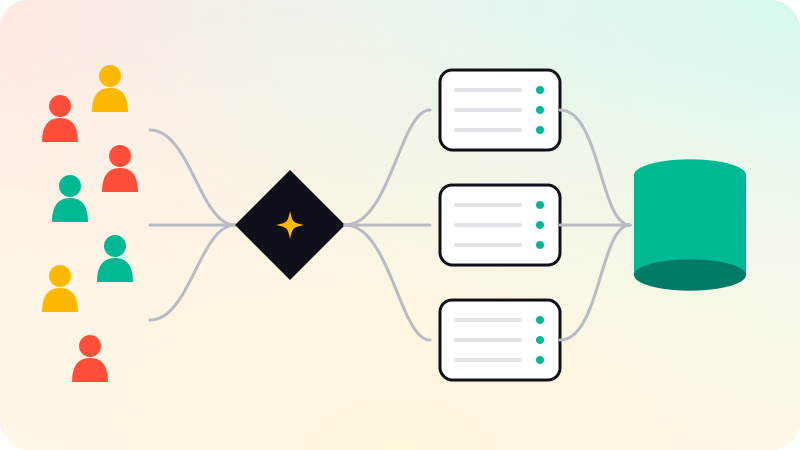
Running several copies of the app behind a load balancer, called scaling horizontally, adds capacity and removes the single point of failure. It works only if the app servers are stateless: any server can handle any request because nothing important lives in one server’s memory or on its disk. The Twelve-Factor App guidance puts it plainly: processes should share nothing, and session data belongs in a datastore rather than in sticky sessions tied to one server. Uploaded files belong in object storage, not on a server’s disk.
Once the app is stateless, most hosting platforms can add and remove servers automatically as traffic rises and falls. Remember that more app servers put more load on the database, which is why pooling and query work come first.
Splitting the app into separate services is the last step, not the first. It makes sense when one part has very different load, such as video processing or search, or when separate teams need to release independently. It also adds network calls, failures between services and more to deploy and monitor. A well-structured single app scales further than most products need. See Monolith vs microservices.
Load test before the traffic arrives
A load test sends simulated users at a copy of your app to find where it breaks before real users do. It is worth running before a launch, a press mention, a marketing campaign or a large customer going live.
- Pick realistic journeys, such as browsing, searching, signing in and checking out, in realistic proportions.
- Use an environment that matches production in size and has a realistic amount of data. A test against an empty database proves little.
- Ramp the load up gradually, past the traffic you expect.
- Watch the same signals as in production: percentile latency, error rate and which resource saturates first.
- Fix the first bottleneck, then run the test again. The next one will be somewhere else.
Symptoms, likely fixes, and when to get help
| What you notice | Likely cause | First thing to try |
|---|---|---|
| Some pages get slower as data grows | Missing indexes or slow queries | Check the slow query log and the query plan, then add indexes or rewrite the query |
| One page fires hundreds of database queries | The N+1 problem | Load related data in one query or a batch |
| Database CPU is high while app servers are idle | Expensive or repeated reads | Optimize queries, cache hot results, then consider a read replica |
| Errors about too many database connections | Each app process opening its own connections | Add a connection pooler and cap connections per process |
| Requests time out while emails or reports are sent | Slow work inside the request | Move it to a background job |
| Pages load slowly for users far away | Static files served from one region | Serve static files and images through a CDN |
| App servers run out of CPU or memory at peaks | Not enough capacity | Make the app stateless and run more servers behind a load balancer |
| Users are signed out at random after adding servers | Sessions stored in one server’s memory | Store sessions in a shared datastore |
Signs it is time to bring in help: you cannot tell where the time goes because there is no monitoring; the same incident keeps coming back; fixes in one place cause failures somewhere else; the database has grown to the point where changing its structure feels risky; or a launch is coming and nobody knows how much traffic the app can take. An outside review of the architecture and the slowest paths is often enough to set the order of work.
If your app is starting to strain under its own growth, web app development describes how we approach the work: the code lives in your GitHub from day one, and the founders are on the calls.
Sources
Checked when this guide was written.